If you wish to use a third-party email applications such as Outlook, Mac, Postbox, iOS, Thunderbird or Kmail to read your emails, you will need to know your email configuration settings in order to link them up.
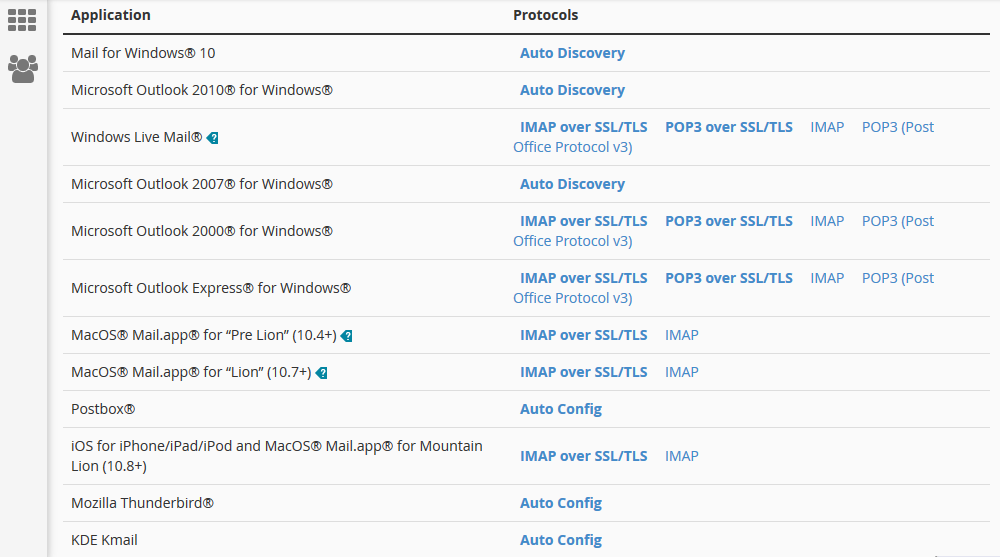
cPanel can automatically configure the settings for you on the most popular email applications. To do so, login your cPanel, under the Email heading, click Email Accounts.

This will bring you to the Email Accounts page. Scroll down to see the list of email accounts you have. Create one if there is none. To the right there is the Connect Devices option under the Actions tab, then choose Set Up Mail Client. This is where you can configure your email accounts to work on the email application.

- IMAP email access coordinates between the server and your mail application. Messages that have been read/deleted/replied to will show up as such, both on the server and in the mail application.
- POP3 does not coordinate with the server. Messages marked as read/deleted/replied to in the mail application will not show up as such on the server. This means that future mail downloads with POP3 will show all messages as unread.
Depending on your personal requirements, any of the 2 will work.
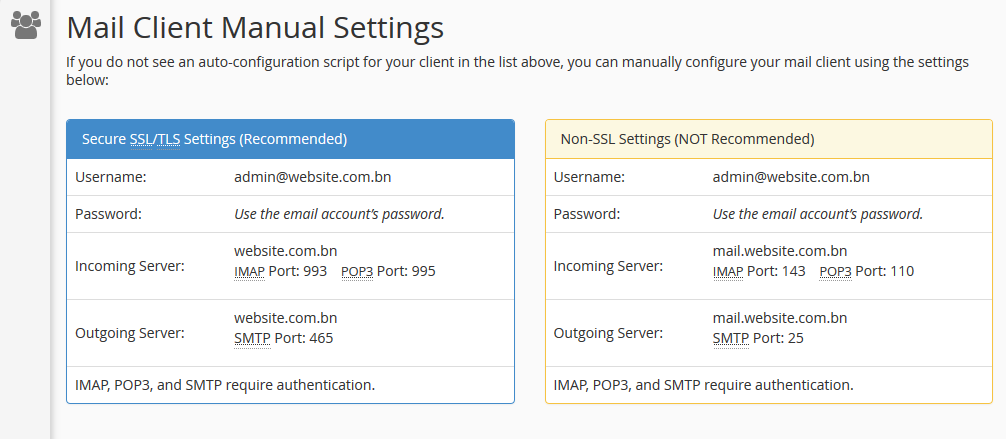
Note: If your website does not have a SSL certificate, it is perfectly fine to use the non-SSL settings (yellow box), even though it says not recommended.
If you do not have administrative access to the cPanel, you can find the configuration settings on your Webmail > Email address on the top right > Configure Mail Client
