PHP has many environmental variables that you are able to update as needed. For example, you may need to update your php memory_limit to prevent certain scripts from running out of memory. In order to change these values, you must first be able to see what they are. To do that, you will need to create a phpinfo page. A phpinfo page shows you all of your php environment settings.
A phpinfo page is simply a php page with the following code:
<? phpinfo(); ?>
How to Create a phpinfo Page
If you're not familiar with how to create a php page, follow the steps below to create a phpinfo page using your File Manager.
- Log into your cPanel.
- Open your
File Manager. - Navigate to the directory you are working with. This is important because each folder can actually be set to have different php settings. In this example, we are viewing the php settings for our main domain, so we are navigating to the public_html folder.
- In the top menu, click New File.
- When prompted for the file name, enter phpinfo.php (it can actually be named anything, phpinfo.php is simply a common name for the file).
- Find the phpinfo.php file in your list of files (it should have automatically updated). Right click on it and choose "Edit". If you see a "Text Editor" prompt, choose "utf-8" from the drop down list and then click "Edit".
- Enter the following text:
<? phpinfo(); ?>
Then click Save Changes.
How to View your PHP Settings
You can now access this page from your browser. If you created the file
in your public_html folder, then you would visit
http://example.com/phpinfo.php. The results should look similar to the
screenshot below:
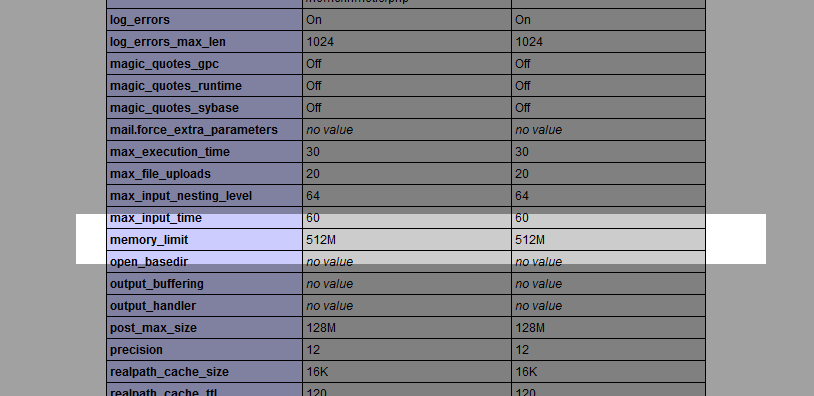
To find the specific value of a setting, search the page for what you're
looking for. In this example, you can use the browser's search feature (Ctrl + f) and searched for variables you want such as memory_limit.
The first value you see is what is set for the current directory (local
value), and the setting value is the master value. The local value is
the actual setting and is the important value, because the local values
will override the master value.
Please note that your phpinfo page has many php
settings that you don't want to broadcast to the world. When you're
finished with viewing the file, be sure to delete it. Another route you can
take instead of deleting it is naming the file something other
than phpinfo.php. As phpinfo.php is such a common name, 'bots' on the
web will randomly search for files named phpinfo.php. Setting the file
name to something like 9823592374823.php will make it harder to be guessed by a bot but it may be difficult for you to
remeber this in the future.